
WELCOME
We’re glad that you’ve made the decision to partner with us and are looking forward to helping you reach your goals!
QUICK SUCCESS INSTRUCTIONS
You DON’T have to be great to start, but you have to start to be GREAT! -Zig Ziglar-
Final Expense & Medicare Advantage Contracting Steps:
Final Expense Contracting
Please follow the steps below to complete Final Expense Contracting:
Complete the Calsurance registration via the following link: CLICK HERE
CLICK ON “NEW USER” & Complete SuranceBay link & choose the carriers for Life & Medicare Supplements in your area. If you need assistance finding the carriers for your area, please contact me and I will be happy to assist you further.
(Most commonly used carriers: Trinity, MoOmaha, Oxford, Foresters, Sentinel, Americo, Royal Neighbors of America, Aetna, Transamerica, Great Western, American General, Gerber,, Columbian, American Amicable, Liberty Bankers Life, Cigna, Philadelphia American, Phoenix, Baltimore Life, Security National Life, Bankers Fidelity, Standard Life & Casualty, United Home Life, Renaissance Life, American National & Prosperity.)
Should you encounter an error running flash, please follow these steps:
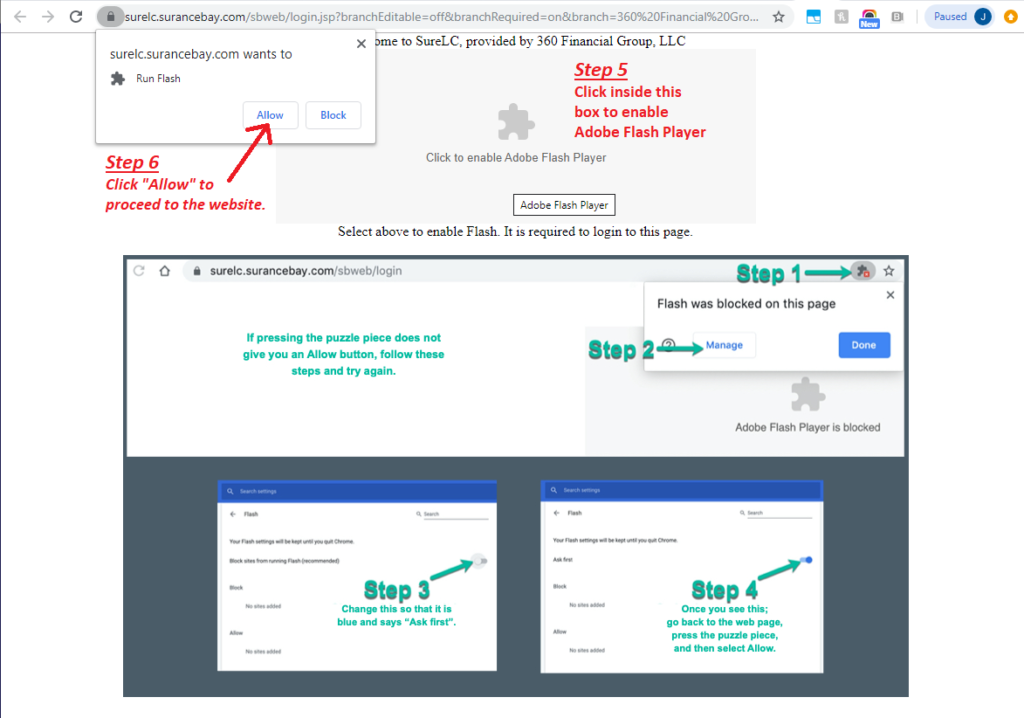
ANTI-MONEY LAUNDERING TRAINING COURSE ACCESS INSTRUCTIONS:
If your carrier has already sponsored you for AML training, go to (aml.limra.com)
-OR-
If you can’t get logged in because a carrier hasn’t sponsored you yet then go to AmAm and follow these instructions:
American-Amicable (http://www.americanamicable.com)
- Click on “Marketing Sales” (Under the Login Tab)
- Enter Agent No., and Password. (Agent No. is: aml and Password is: course)
- Hit enter and follow instructions.
IMPORTANT!!! When you complete the course, a company AML training course certification page will reflect on your computer screen. Make 2 copies of this page. One is for your files and the other MUST be sent to the Company with your contracting paperwork. IF THE CERTIFICATION PAGE IS NOT SENT TO THE COMPANY WITH YOUR CONTRACTING PAPERWORK, YOUR CONTRACT WILL NOT BE PROCESSED!!
Obtain 1 million dollar E&O insurance
Following are a few options to consider and/or compare:
https://www.napa-benefits.org/errors-and-omissions
Order business cards, magnet cards & yellow door stickers (examples are in Dropbox).
Download these 5 apps to your phone:
- Dropbox ($20/month for Pro version),
- Groupme
- 360 Financial Quoting Tool
- Fexquotes.com to be able to quote carriers on phone (text me when you completed). (***You will NEED to have requested carriers already through SuranceBay, then create account & request access on the 360 quoting tool and then we will approve your account).
- Download “TinyScanner” App so you can easily scan and email applications and lead order forms.
Buy an all-in-one printer to copy/scan/fax & have a fax line ready at your home or office (or get an e-fax).
Get a Garmin for your car or download the app (Roadwarrior.com) if you do not have a Garmin.
As you start getting applications in from the companies, you need to fill one out on yourself for practice and takes notes of all the parts you don’t understand.
- PUT 3 APPLICATIONS FROM EACH CARRIER IN YOUR TRUNK!!!
You will need to request access to the Training website by going to www.360ThinkTank.com and completing the “Request Access” form on the page. Once access has been granted, you will be able to view the training materials and videos on the site.
You’ll also find useful information on our private Facebook Group, The Squad Advantage. Please take the time to request access to this page if you are a Facebook user: https://www.facebook.com/groups/210184770028159/
If you have not already been granted access to Dropbox, please contact me and I will make sure that it is granted.
On Dropbox, open the folder called “NEW AGENT FOLDER” and study EVERYTHING there.
- Study the “Underwriting FE” cheat sheet, Conf Call recordings (Final Expense/Medicare), & ALL videos in Dropbox
- Videos to watch 1st in the Video section of Dropbox: InHome Presentation, Anatomy of 10K week, Interview 500K, Me appt setting live, My Presentation, What’s in my binder (watch these videos NUMEROUS times)!!!
Start putting your binder together (there are about four necessary forms that must be printed off & placed in your binder that are in dropbox in the “What’s in my binder” folder).
Begin to store your agent writing numbers from each carrier on your phone as they arrive. This will provide you quick and easy access when you need them for applications or for support assistance with the carrier.
Start your lead order: Tele-Leads, Facebook leads, Direct Mail, Senior Centers & Aged leads.
Lead order links provided on Training Website, www.360ThinkTank.com.
Start studying the door-knocking script in Dropbox titled “Door Knock Script” & study “OBJECTIONS-DIRTY DOZEN” sheet found in Dropbox so you’re prepared for ANY & ALL objections at the door or in the home.
Figure out how you are going to work the leads. Door knocking, calling for appt. or hiring an appt. setter. I will go over all of this with you.
A new agent that is tight on money should always set their own appts.
Start learning the presentation. Study my video in dropbox titled “MY PRESENTATION” and record yourself doing it and send to me. Practice on friends & family. (This is one step most agents fail to do and it costs them a lot!). It should sound just like mine before your leads arrive.
Once you have leads and writing numbers and are ready, call me and we will role play your presentation before you hit the field.
This is a great time to start working aged $2-$20 leads (if available in your area) or other inexpensive leads to get some practice while waiting on your lead order.
BE ON ALL FINAL EXPENSE CONFERENCE CALLS MONDAY MORNING!!!
If there is anything that you’ve run into in the field that you have questions about please private message me so we can possibly discuss on calls.
Dial in number= (Will be sent in your onboarding email)
Participant code= (Will be sent in your onboarding email)
- FE CONF CALL Every Monday morning at 8:30AM CST
Please MUTE your phone (instructions provided when you call in) unless you need to speak. This will help us keep distractions to a minimum so that everyone can hear clearly.
Leads should be here now.
Start calling Saturday at 9:30am to schedule at least 5 appointments for Monday & have a BIG Monday. It’s called MOMENTUM MONDAY for a reason…a BIG MONDAY starts your week off in a positive manner!!!
We are here to help you!
In an appointment and don’t have an answer? Phone a trainer!
Not sure what carriers take specific conditions? Phone a trainer!
Not sure if you are compliant? Phone a trainer!
Our trainers are ready and willing to help you whenever you need it.
Final Expense Trainers
Matt Mungia – (281) 536-4220
Ruben Trejo – (713) 480-3120
Medicare Advantage Contracting
Please follow the steps below to complete Medicare Advantage Contracting:
Click on the following link to request your Medicare carriers and contracting: CLICK HERE
Main Carriers to contract with: Humana, Amerigroup, United Health Care, Cigna, Aetna & Heartland for Hospital Indemnity Plans
(Contact us to discuss additional carriers specific to your area)
Be on the look-out for emails from the carriers you contracted with, as some of them will need you to click on links within the emails they will send you. Make sure to check spam & junk folders in case the carriers emails accidentally got dropped in there.
Finish carrier specific certifications for each carrier that you are contracting with. Call & Confirm with each carrier that you are READY TO SELL for them.
Obtain 1 million dollar E&O insurance
Following are a few options to consider and/or compare:
https://www.napa-benefits.org/errors-and-omissions
When certifying with your Medicare Advantage carriers, there will be a link provided to complete your AHIP training. You will receive a $50 discount if you take the course through the carrier’s site. If you have any questions or if you do not see the link, please contact us and we will help you navigate the process.
Additionally, you can complete AHIP Training via the following link: https://www.ahipmedicaretraining.com/ext/ahip/login.php
Order business cards, magnet cards & yellow door stickers (examples are in Dropbox).
Download these 5 apps to your phone:
- Dropbox ($20/month for Pro version),
- Groupme
- Download “TinyScanner” App so you can easily scan and email applications and lead order forms.
Buy an all-in-one printer to copy/scan/fax & have a fax line ready at your home or office (or get an e-fax).
Get a Garmin for your car or download the app (Roadwarrior.com) if you do not have a Garmin.
You will need to request access to the Training Website by going to www.360ThinkTank.com and completing the “Request Access” form on the page.
Login details will be provided to you promptly after your request is submitted.
Once you receive login details, begin by watching training modules 1-6 in the Medicare section and then watch the rest of the videos.
You’ll also find useful information on our private Facebook Group, The Squad Advantage. Please take the time to request access to this page if you are a Facebook user: https://www.facebook.com/groups/210184770028159/
If you have not already been granted access to Dropbox, please contact me and I will make sure that access it is granted for additional helpful resources.
Begin to store your agent writing numbers from each carrier on your phone as they arrive. This will provide you quick and easy access when you need them for applications or for support assistance with the carrier.
As you start getting applications in from the companies, you need to fill one out on yourself for practice and takes notes of all the parts you don’t understand.
- PUT 3 APPLICATIONS FROM EACH CARRIER IN YOUR TRUNK!!!
Start your lead order: Tele-Leads, Facebook leads, Direct Mail, Senior Centers & Aged leads.
Lead order links provided on Training Website, www.360ThinkTank.com.
BE ON ALL MEDICARE ADVANTAGE CONFERENCE CALLS TUESDAY MORNING!!!
If there is anything that you’ve run into in the field that you have questions about please private message me so we can possibly discuss on calls.
Dial in number= (Will be sent in your onboarding email)
Participant code= (Will be sent in your onboarding email)
- MEDICARE CALL Every Tuesday morning at 8:30AM CST
Please MUTE your phone (instructions provided when you call in) unless you need to speak. This will help us keep distractions to a minimum so that everyone can hear clearly.
We are here to help you!
PHONE A TRAINER
In an appointment and don’t have an answer? Phone a trainer!
Not sure what carriers take specific conditions? Phone a trainer!
Not sure if you are compliant? Phone a trainer!
Our trainers are ready and willing to help you whenever you need it.
Medicare Trainers
Luis Moreno – (210) 639-0738
Patrick Romero – (830) 515-8125
Adam Howard – (248) 270-7223
GROUP ME
Download the “GROUPME” app and join us there as we talk all things Medicare on the Medicare Round Table discussion forum. This is a great place to connect with other producers and ask questions.
GET CONNECTED
Questions about connecting with 360 Financial Group? Fill out this form to get in touch.
FAX LINE
1.314.735.4070
OFFICE LINE
1.314.821.0582
WORKING HOURS
9:00am – 6:00pm
OFFICE LINE
1.314.735.4070
OFFICE LINE
1.314.821.0582
WORKING HOURS